Overview
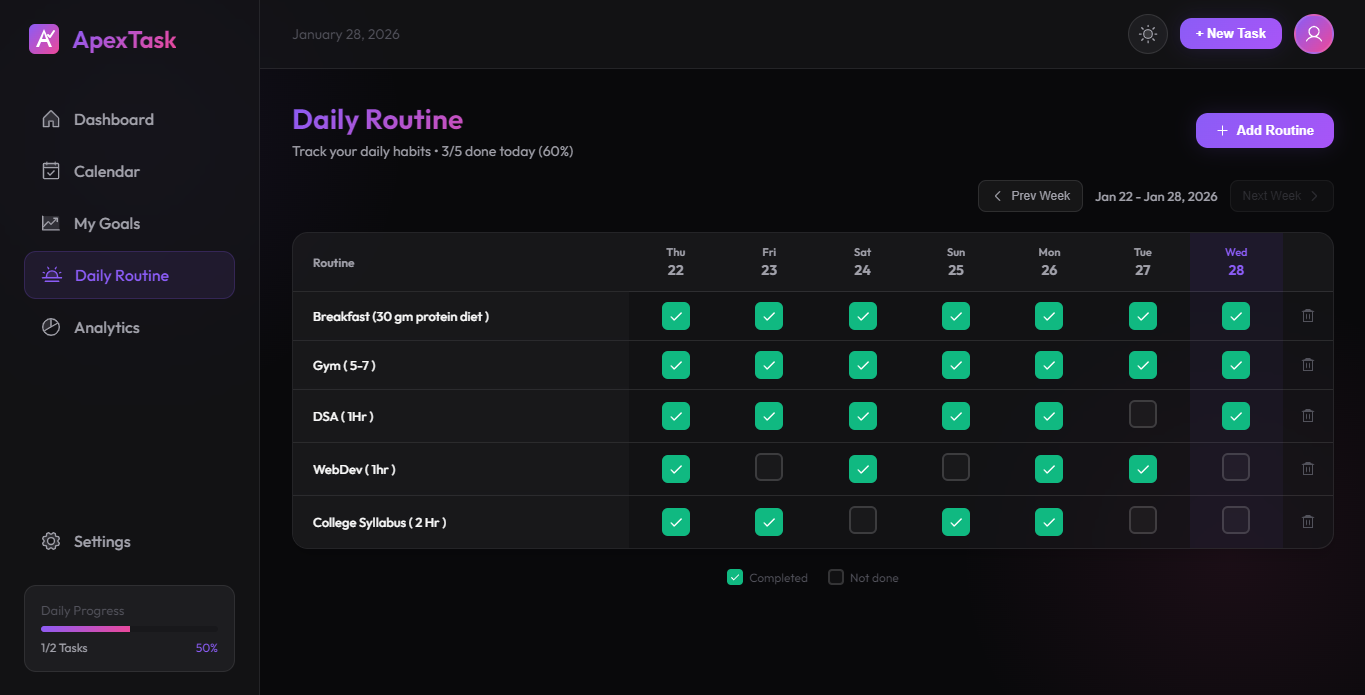
The Daily Routine feature provides an Excel-like grid view for tracking recurring daily habits. See your entire week at a glance and check off completed routines for each day.
How It Works
The routine tracker displays a table with:
- Rows - Each routine item you want to track
- Columns - Days of the week (Mon-Sun)
- Checkboxes - Click to mark a routine as complete for that day
Adding Routines
-
Click "Add Routine"
Click the "Add Routine" button at the top.
-
Enter Routine Name
Give your routine a clear name (e.g., "Morning meditation", "Read 30 mins").
-
Start Tracking
Your new routine appears in the grid. Check it off each day you complete it.
Weekly Navigation
Use the navigation arrows to view previous weeks. This allows you to:
- Review your past performance
- Identify patterns in your routine completion
- Fill in any missed check-ins from earlier in the week
Daily Progress
At the bottom of each column, you'll see the daily progress percentage showing how many routines you completed that day.
Example Routines
- ☀️ Morning exercise
- 📚 Read for 30 minutes
- 🧘 Meditate
- 💧 Drink 8 glasses of water
- 🌙 No screens before bed
- 📝 Journal writing