Overview
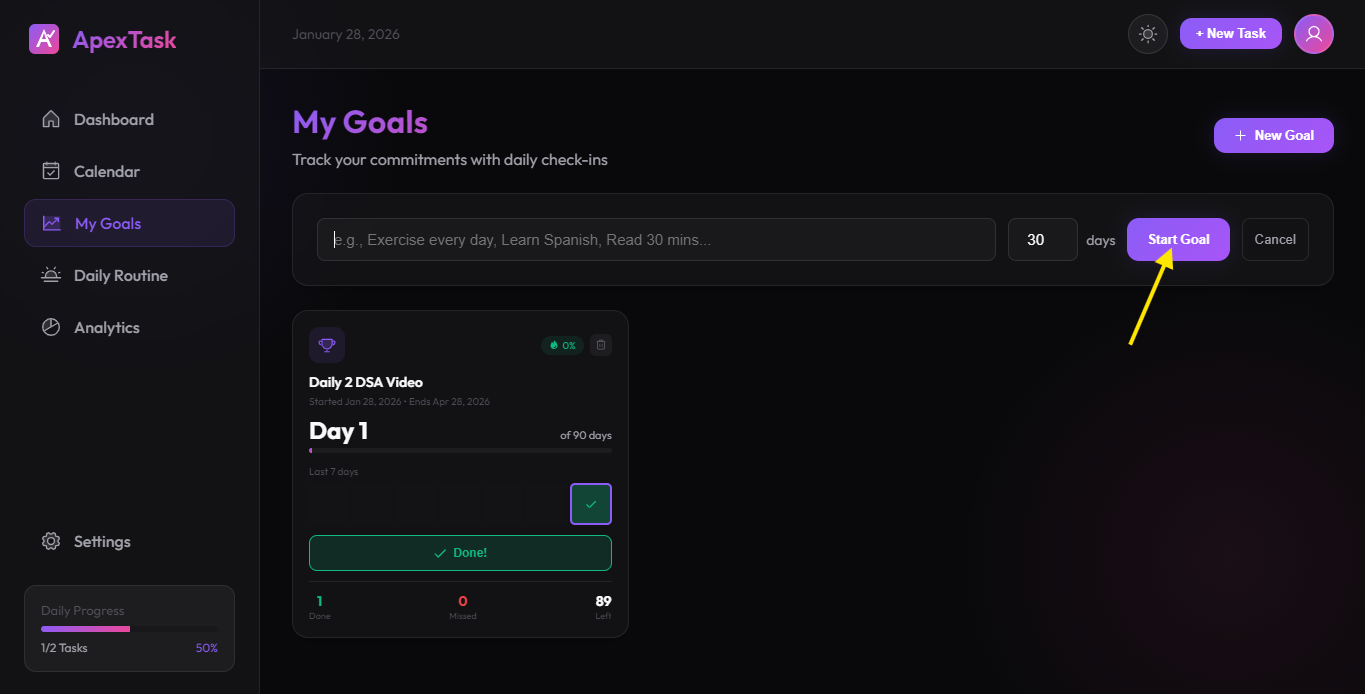
The Goals page helps you create and track long-term goals with daily check-ins. Build streaks, visualize progress, and develop consistent habits.
Creating a Goal
-
Click "Create Goal"
Click the "Create Goal" button at the top of the page.
-
Enter Goal Details
Give your goal a clear, actionable name (e.g., "Exercise for 30 minutes").
-
Set Duration
Choose how many days you want to commit to (e.g., 30 days, 60 days, 90 days).
-
Start Tracking
Your goal is now active! Check in daily to build your streak.
Goal Card Components
- Goal Name - The title of your goal
- Progress Bar - Visual indicator of your overall completion
- Streak Count - Current consecutive days completed
- Completion Percentage - Overall check-in rate
- Last 7 Days - Visual display of recent activity
- Check-in Button - Mark today as complete
Building Streaks
Streaks are a powerful motivation tool. Here's how they work:
- Check in every day to build your streak
- Missing a day breaks your streak (but you can start again!)
- Your streak count shows on both the goal card and dashboard
- Completed days show as green, missed days as red
Tips for Success
- Start with small, achievable goals
- Check in at the same time each day
- Enable goal reminders in Settings
- Don't be discouraged by breaks - just start again!