Overview
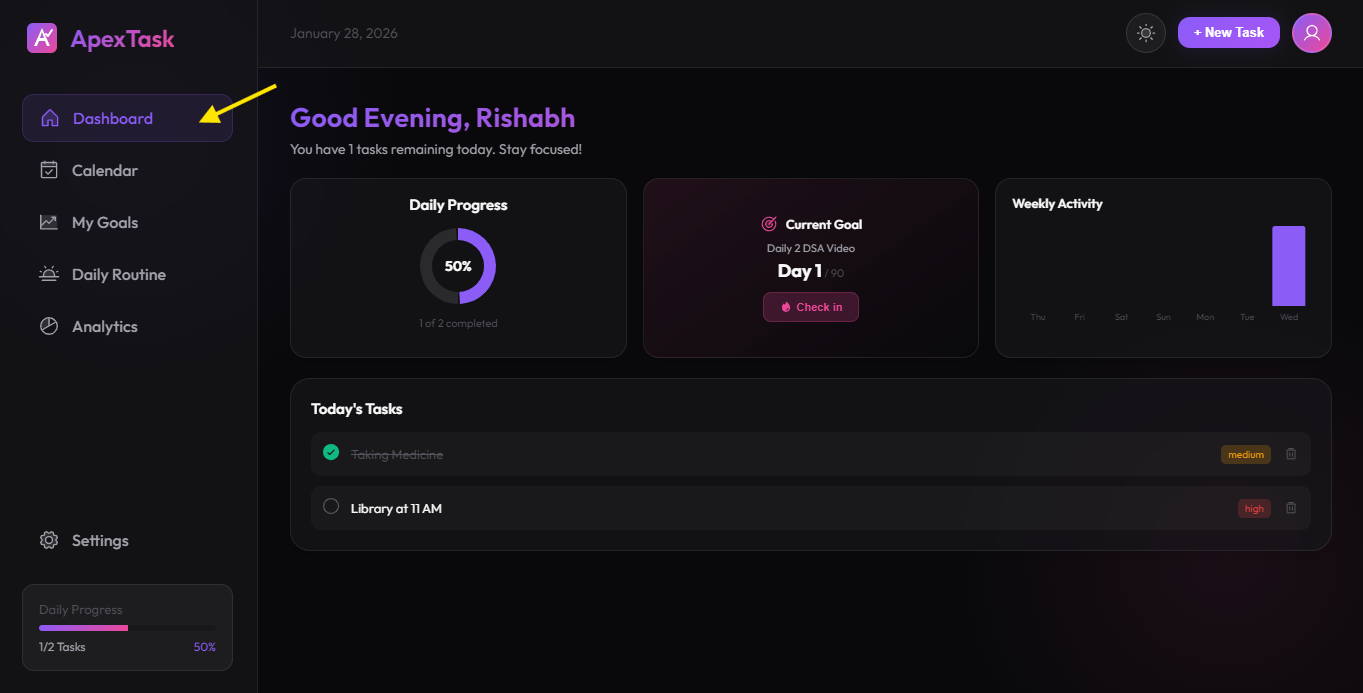
The Dashboard is your home base in ApexTask. It provides a comprehensive overview of your daily productivity, including task progress, active goals, and weekly activity trends.
Dashboard Components
📊 Daily Progress
A beautiful pie chart showing your task completion progress for today. It displays the percentage of completed tasks and dynamically updates as you check off items.
🎯 Active Goal Summary
See your currently active goal at a glance. If you don't have an active goal, you'll see a prompt to create one. This section shows:
- Goal name and progress percentage
- Current streak count
- Quick check-in button
📈 Weekly Activity
A bar chart displaying your task completion trends over the past 7 days. This helps you identify patterns and stay motivated by seeing your consistency.
📋 Today's Tasks
A list of all tasks scheduled for today, showing:
- Task title and priority level
- Checkbox to mark tasks as complete
- Delete button to remove tasks
Creating Tasks
To create a new task from the Dashboard:
- Click the "+ New Task" button in the header
- Enter the task title
- Select a priority level (High, Medium, or Low)
- Choose the date for the task
- Click "Create Task" to save
Personalized Greeting
The Dashboard greets you with a personalized message based on the time of day:
- Good Morning - 5:00 AM to 11:59 AM
- Good Afternoon - 12:00 PM to 4:59 PM
- Good Evening - 5:00 PM to 8:59 PM
- Good Night - 9:00 PM to 4:59 AM